Users & Roles
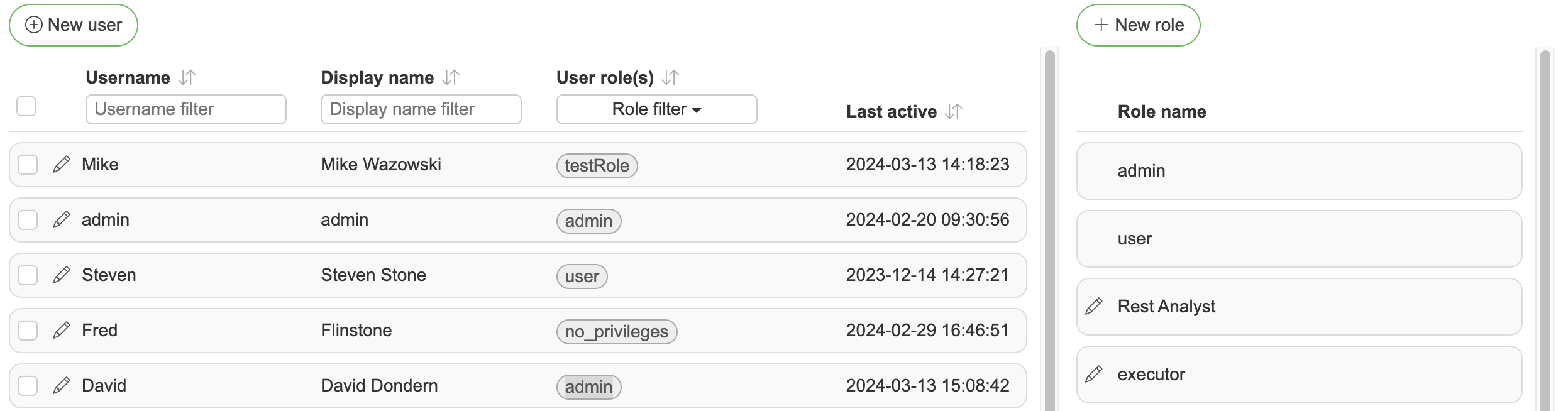
The users list shows each user's activity indicator (green when a session is active), display name, roles and last activity, and can be filtered from the column headers. Clicking a row opens the user for editing; clicking a role in the roles panel opens the role.
DQM has two predefined roles:
admin - Allows all privileges & actions inside DQM and has access to all data sources. Admin users can modify all DQM settings
user - Allows all privileges inside DQM and has access to all data sources
Adding a custom role
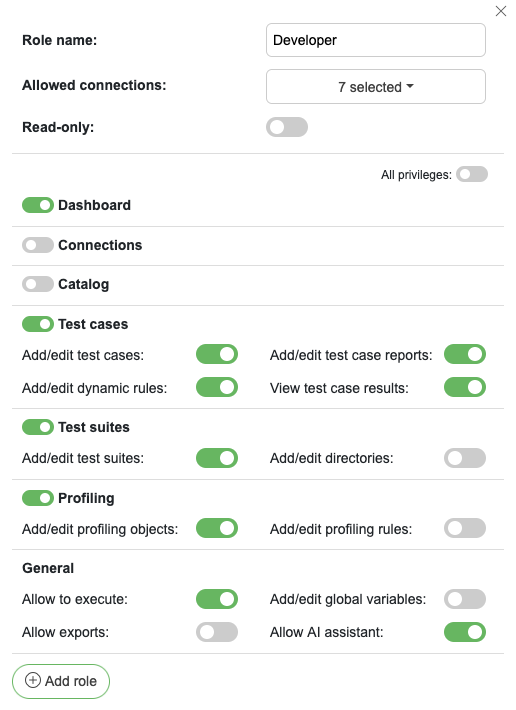
Role name - Identifier role name
Allowed connections - Allowed data sources for given role
External directory group - Optional AD/LDAP group or OAuth groups-claim value (full DN or plain name) that maps to this role for automatic role syncing. The built-in admin and user roles can also be mapped: clicking them in the role list opens an editor with just this field, since their privileges are fixed
Read-only - Defines given role as read-only, which will be assigned to license read-only users
Privileges - Access to specific functionalities of DQM. You can also use "All privileges" slider to enable all DQM functionalities or disable specific pages for selected role.
The same dialog opens when clicking an existing role, with Save and Delete buttons.
Adding a read-only role
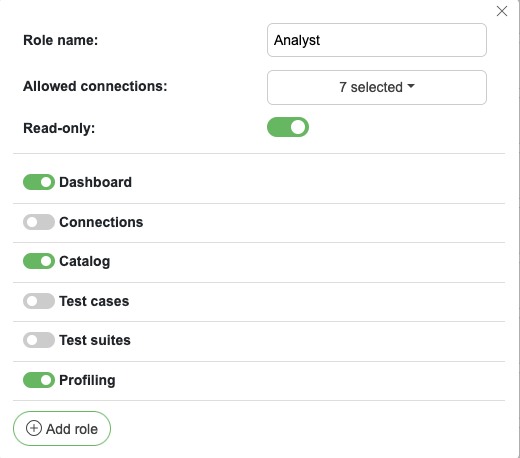
For read-only users you can choose specific pages they have access to (plus View test case results under Test cases). Ticking the Read-only checkbox hides the other privilege toggles.
Adding a new user
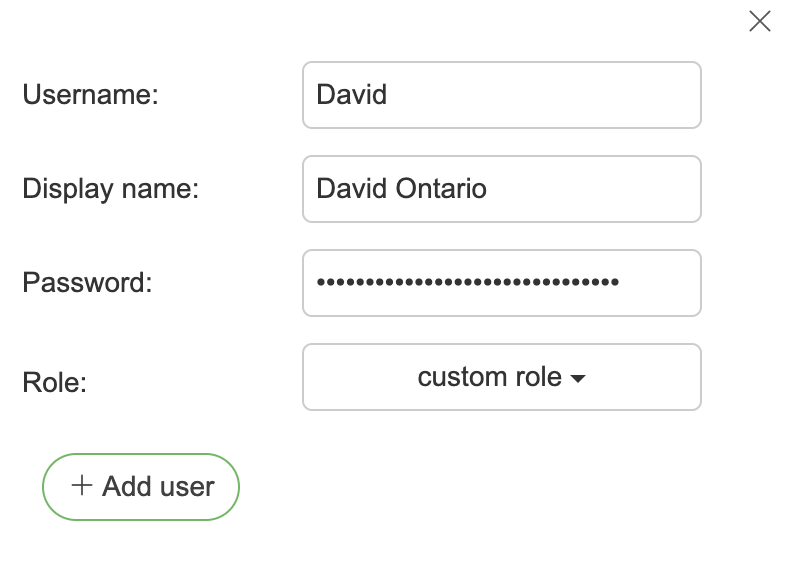
Username - Username identifier
Display name - Display name which will be displayed throughout DQM
Email - User email address used for alerts
User type - Internal users sign in with a password managed in DQM. External users sign in through OAuth, LDAP or Active Directory; they have no password at all, and their roles can be managed from the directory (see automatic role syncing). The type is shown next to every user in the list and cannot be changed after the user is created.
Password - Internal users only (Password must be between 12 - 72 characters and strong enough; the form shows a live strength meter, and a few uncommon words work better than symbol substitutions). The field is hidden for external users, and a password can never be added to one later.
Roles - One or more roles determining what the user can do in DQM based on the privileges and allowed connections assigned to them.
Bulk user actions
Selecting users with the row checkboxes replaces the toolbar with bulk actions: Assign (add or remove roles on all selected users at once, every user must keep at least one role), Delete users, and Terminate sessions, which logs the selected users out immediately.
Recovering admin user
If in some case admin user credentials are forgotten, admin user password can be reset from the application machine. DQM container/JAR file should be rerun with parameter “dqm.recovery.password”
Temporary users
Temporary users are auto-generated read-only users created when visitors access DQM via the "Continue as a temporary user" button on the login page or the shareable link /login/anonymous.
Temporary user access can be enabled from General settings.
How it works
A visitor opens the login page and clicks "Continue as a temporary user", or navigates directly to
/login/anonymousA new user with a randomly generated name and the configured reader role is created automatically
The visitor is logged in and redirected to the dashboard
What temporary users can do
Temporary users are assigned a reader role — they can only view data, not modify it
They are automatically cleaned up when their session expires or when they log out
Managing temporary users
In the admin user management view, temporary users can be viewed and deleted but not edited
The maximum number of concurrent temporary users is configurable to prevent abuse
The link
/login/anonymouscan be shared directly with external visitors — anyone with the link can access DQM without needing credentials
Privileges
The privileges below correspond to the toggles in the role-edit dialog. Each section starts with a top-level "view" privilege that grants access to the page; all sub-privileges in that section additionally require that view privilege to be enabled.
Dashboard
View dashboard - Grants access to the dashboard page
Add/edit dashboard - Allows creating, editing and deleting dashboard tiles and layout
Connections
View connections page - Grants access to the connections page
Add/edit connections - Allows creating, editing and deleting data source connections
Catalog
View catalog page - Grants access to the data catalog page
Add/edit catalog objects - Allows creating, editing and deleting catalog objects
Add/edit glossary terms - Allows managing business glossary terms
Add/edit business rules - Allows managing business rules
Allow catalog imports - Allows running catalog imports from external sources
Directories - Allows managing the catalog, glossary and business rule directory trees
View sample data - Allows viewing the Data tab with a sample of the object's actual rows
Refresh sample data - Allows fetching fresh sample data, including offering it as AI context
Test cases
View test cases page - Grants access to the test cases page
Add/edit test cases - Allows creating, editing and deleting test cases, including importing them from a file
Add/edit test case reports - Allows managing test case reports
Add/edit dynamic rules - Allows managing dynamic rules used to auto-generate test cases
View test case results - Allows viewing test case run results and history
Test suites
View test suites page - Grants access to the test suites page
Add/edit test suites - Allows creating, editing and deleting test suites
Add/edit directories - Allows managing the test suite directory tree
View test suite reports - Allows viewing test suite reports
Add/edit suite reports - Allows creating, editing and deleting test suite reports
Profiling
View profiling page - Grants access to the profiling page
Add/edit profiling objects - Allows managing objects to profile
Add/edit profiling rules - Allows managing profiling rules
General
Allow to execute - Allows running test cases, test suites and profilings
Add/edit global variables - Allows managing global variables
Allow exports - Allows exporting data and configurations from DQM
Allow AI assistant - Grants access to the AI assistant (requires the assistant to be enabled in global settings). Covers both test-case generation and catalog description enrichment.
Add/edit custom fields - Allows managing custom fields on catalog objects and other entities.
View change history - Allows viewing audit history / change diffs on entities.
Generate PATs - Allows the user to create and manage their own personal access tokens for the MCP server. The privilege is only shown in the role dialog while MCP is enabled on the instance. Without this privilege the user does not see the PATs tab in their profile.
Example users & roles
The examples below show how roles can be designed for different personas, and how a user inherits the union of privileges from all roles assigned to them.
The first column lists the main privileges (grouped by section, matching the role-edit dialog); a checkmark (✓) marks privileges the role grants.
R1 - data steward
R2 - data analyst
R3 - data engineer
R4 - product owner
C1 - Connection 1
C2 - Connection 2
C3 - Connection 3
Privilege / role | R1 | R2 | R3 | R4 |
|---|---|---|---|---|
Allowed connections | C1 | C1, C2 | C1, C2, C3 | C3 |
Dashboard | ✓ | ✓ | ||
Connections | ||||
Add/edit connections | ||||
Catalog | ✓ | ✓ | ✓ | |
Add/edit catalog objects | ✓ | ✓ | ||
Add/edit glossary terms | ✓ | ✓ | ||
Add/edit business rules | ✓ | ✓ | ||
Allow catalog imports | ✓ | ✓ | ||
Directories | ✓ | ✓ | ||
Test cases | ✓ | ✓ | ||
Add/edit test cases | ✓ | ✓ | ||
Add/edit test case reports | ✓ | ✓ | ||
Add/edit dynamic rules | ✓ | ✓ | ||
View test case results | ✓ | |||
Test suites | ✓ | ✓ | ||
Add/edit test suites | ✓ | ✓ | ||
Add/edit directories | ✓ | ✓ | ||
Profiling | ✓ | ✓ | ||
Add/edit profiling objects | ✓ | |||
Add/edit profiling rules | ✓ | |||
Allow to execute | ✓ | ✓ | ||
Add/edit global variables | ✓ | ✓ | ||
Allow exports | ✓ | ✓ | ||
Allow AI assistant | ✓ | ✓ | ||
Generate PATs | ✓ |
When a user is assigned multiple roles, both their allowed connections and their privileges are unioned across those roles.
User | Roles | Explanation |
|---|---|---|
U1 | R4 | Can only access dashboard and catalog for one specific connection. Basically a reader role for a specific data source. |
U2 | R1, R2 | Can access databases C1, C2 and all functionality, other than editing connections and editing profilings. |
U3 | R2, R4 | Exactly same privileges as just R2 + access to C3 database with these privileges. |
U4 | R1, R2, R3, R4 | Can do everything but access connection editing. |
U5 | R1, R4 | Can execute test cases against C1+C3 database (access privileges are stacked). |